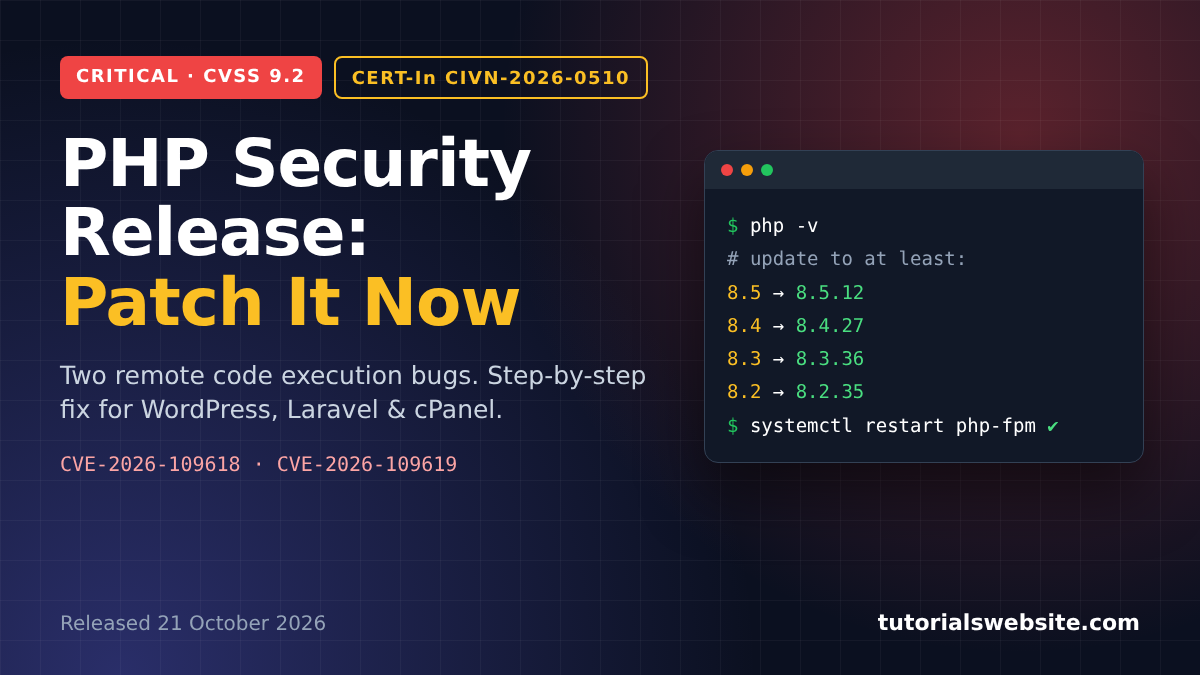
On 21 October 2026 the PHP team pushed out an emergency PHP security release for two bugs that let an attacker run code on your server without logging in. The fixed versions are PHP 8.5.12, 8.4.27, 8.3.36 and 8.2.35. PHP.net rates both bugs 9.2 out of 10 (CVSS v4.0), and India’s CERT-In marked its advisory on them, CIVN-2026-0510, as Critical on the same day.
If you run WordPress, WooCommerce, Laravel or any custom PHP site, please patch today. Below: what broke, which version you need, and the commands I’d use on a VPS, Laravel Forge or shared hosting.
Get a professionally designed and developed website tailored to your needs.
As an experienced website developer based in Delhi NCR, I offer customized solutions to build responsive, SEO-friendly, and user-friendly websites. Whether it’s for a personal blog, business site, or e-commerce store, I ensure your online presence stands out.
PHP security release October 2026: how to patch CVE-2026-109618 and CVE-2026-109619
| Item | Details |
|---|---|
| Release date | 21 October 2026, 14:00 UTC (7:30 PM IST) |
| CVEs | CVE-2026-109618, CVE-2026-109619 |
| Nickname in the press | “PHP2Shell” |
| Severity | CVSS v4.0 9.2 (php.net), Critical (CERT-In) |
| Impact | Remote code execution, no login needed |
| Fixed versions | 8.5.12, 8.4.27, 8.3.36, 8.2.35 |
| No official fix | PHP 8.1 and older |
| Affected setups | PHP-FPM, Apache mod_php, php-cgi, FrankenPHP, LiteSpeed |
What the two bugs do
CVE-2026-109618: a crash that leaves memory half-built
PHP’s advisory for CVE-2026-109618 says out-of-memory handling “can interrupt PHP while internal request data is only partially initialized.” If an attacker can push a request into that state on purpose, they may be able to corrupt memory and get code running on the server.
CVE-2026-109619: leftover state after memory is freed
CVE-2026-109619 is a use-after-free problem. In the advisory’s words, “request-owned internal state can survive after its backing memory has been freed.” PHP-FPM keeps workers alive between requests, so leftovers from one request can be abused in the next.
The PHP 8 changelog entry for the fix is short: “Avoid state corruption via bailout.”
Who is exposed
Almost every PHP website. The PHP team lists “PHP-FPM, Apache with mod_php, php-cgi, FrankenPHP and LiteSpeed,” and says mod_php setups carry the most risk. Indian news sites such as Business Today have been calling the pair “PHP2Shell,” so expect your clients to ask about it by that name.
CERT-In advisory CIVN-2026-0510
CERT-In, India’s national cyber security agency, published vulnerability note CIVN-2026-0510, “Critical remote code execution vulnerabilities in PHP,” on 21 October 2026 and updated it on 23 October. It lists the same affected branches: PHP 8.5 before 8.5.12, 8.4 before 8.4.27, 8.3 before 8.3.36 and 8.2 before 8.2.35.
The line that worried me most: “Multiple reports confirm large scale exploitation in the wild, users are advised to patch urgently.” Attackers are already using these bugs.
CERT-In’s advice matches PHP’s: install the updates and apply the mitigations in the php.net advisory.
Which PHP version should you install?
Find your branch and move to at least the version on the right:
- PHP 8.5 → 8.5.12
- PHP 8.4 → 8.4.27
- PHP 8.3 → 8.3.36
- PHP 8.2 → 8.2.35 (8.2 itself reaches end of life on 31 December 2026, so plan the next jump now)
- PHP 8.1 or older → no official fix, so upgrade to a supported branch (see PHP’s supported versions page)
Step 1: check which PHP version you’re running
Over SSH:
bash
php -v
php-fpm8.4 -v   # use your own version number
Command-line PHP isn’t always the build serving your site. To check the site itself, drop a temporary file in the web root:
php
<?php
// check-version.php: delete this right after you use it
echo PHP_VERSION;
Open it in a browser, note the number, delete the file.
In WordPress you’ll find the version under Tools → Site Health → Info → Server. With WP-CLI:
bash
wp --infoStep 2: update PHP on an Ubuntu or Debian VPS
Most Indian businesses I work with on DigitalOcean, AWS Lightsail or Hostinger VPS run Ubuntu. Before you upgrade, check whether your package source has the patched build yet:
bash
sudo apt-get update
apt-cache policy php8.4-fpm
If the “Candidate” line shows the fixed version, upgrade every package for that PHP version. This is the command Laravel Forge gives in its advisory:
bash
sudo apt-get install --only-upgrade -y -o Dpkg::Options::="--force-confold" \
  $(dpkg -l 'php8.4*' | awk '/^ii/ {print $2}')
Restart PHP-FPM and reload the web server:
bash
sudo systemctl restart php8.4-fpm
sudo systemctl reload nginx   # or: sudo systemctl restart apache2
Do this for every PHP version on the box. A forgotten 7.4 or 8.1 install sitting next to 8.3 is just as open to attack. If the same server also runs Node apps, patch those too: the Node.js security release of 21 October 2026 landed the same day.
Step 3: Laravel Forge and Laravel apps
Forge’s automatic security updates don’t touch PHP, so you have to do it yourself. Either open the server’s PHP tab in the Forge dashboard and click “Update PHP X.X” for each version, or SSH in and run the Step 2 commands.
PHP-FPM restarts during the update, so expect a few seconds of downtime. Then restart anything long-running so it picks up the new binary:
bash
php artisan queue:restart
php artisan horizon:terminate   # if you use Horizon
php artisan octane:reload       # if you use Octane
Confirm with php8.4 -v and php-fpm8.4 -v.
Step 4: shared hosting and cPanel
On shared hosting the host has to install the fixed builds. You can still check and push them along:
- Look up your version in cPanel under Select PHP Version or MultiPHP Manager, or use the
check-version.phptrick above. - If it’s still below the fixed release, open a ticket and ask when CVE-2026-109618 and CVE-2026-109619 (CERT-In CIVN-2026-0510) will be patched. Citing the CERT-In note makes the urgency clear.
- On PHP 8.1 or older? Back up, test on staging, then switch to 8.3 or 8.4.
Stopgaps if you can’t patch today
PHP’s advisory is blunt: “There are no complete mitigations, updating is the only safe choice.” These settings lower the risk meanwhile. Put them in php.ini or the FPM pool config. ini_set() and .user.ini won’t do the job here.
ini
; For CVE-2026-109619
session.upload_progress.enabled = 0

; PHP 8.5 only
fatal_error_backtraces = 0

; For CVE-2026-109618
post_max_size = 8M   ; 32M if your site takes uploads
The advisory also suggests locking memory_limit=-1 with php_admin_value and not using RLIMIT_AS/RLIMIT_DATA limits. On a small VPS, unlimited memory can crash the server under load, so read the advisory first. Restart the FPM workers after any change.
WordPress and WooCommerce sites
A WordPress core update or a security plugin won’t help with this one, because the bug is in PHP. Keep core current anyway with the WordPress 7.1.3 security release. Your site is covered only once the server runs a patched PHP build. After the update I’d do three things:
- Clear OPcache and any page cache.
- Place a test order and make sure payment callbacks from Razorpay, PhonePe or Cashfree still reach the site, then test your contact forms.
- Read
wp-content/debug.logand the server error log for anything new.
If an old theme or plugin is keeping a store on PHP 8.1, fix that now. WooCommerce store owners can also catch up on our WooCommerce 11.1 developer guide. With attacks already reported, staying put is the bigger risk.
Key takeaways
- The 21 October 2026 PHP security release fixes CVE-2026-109618 and CVE-2026-109619, two remote code execution bugs rated 9.2 by php.net.
- CERT-In advisory CIVN-2026-0510 rates them Critical and reports large-scale exploitation in the wild.
- Update to PHP 8.5.12, 8.4.27, 8.3.36 or 8.2.35. PHP 8.1 and older get no official fix.
- Forge doesn’t patch PHP automatically. Update each installed version yourself.
- Restart PHP-FPM, queue workers, Horizon and Octane after patching.
- On shared hosting, ask your host for a date and quote the CERT-In note.
FAQ
It’s CERT-In’s vulnerability note on the two PHP bugs, issued on 21 October 2026 with a Critical rating. It covers PHP 8.2 to 8.5 before the fixed releases and tells users to patch urgently.
The PHP project no longer releases updates for 8.1 and older, so there’s no official patched version. Upgrade to PHP 8.3 or 8.4.
No. The flaw is in PHP, not WordPress. You or your hosting provider has to update PHP on the server.
Get a professionally designed and developed website tailored to your needs.
As an experienced website developer based in Delhi NCR, I offer customized solutions to build responsive, SEO-friendly, and user-friendly websites. Whether it’s for a personal blog, business site, or e-commerce store, I ensure your online presence stands out.

Pradeep Maurya is the Professional Web Developer & Designer and the Founder of “Tutorials website”. He lives in Delhi and loves to be a self-dependent person. As an owner, he is trying his best to improve this platform day by day. His passion, dedication and quick decision making ability to stand apart from others. He’s an avid blogger and writes on the publications like Dzone, e27.co